 MobiK lets you send free SMS messages from your PC or your mobile to your friends. In addition it also lets you earn “K dollars” for every friend that you refer. You can exchange your K dollars for mobile services and a huge range of really cool mobile phones, music players etc.
The signup process is pretty simple and involves sending a verification code to your mobile phone. Once you complete the initial signup process your account has 100 K dollars by default. Then you can download the application to your mobile phone and use it to send SMS to your friends. In order to send SMS from your mobile phone , you need have a mobile phone which supports Java. A really nice thing is that your friends need not have the application installed on their cell phones in order to receive messages sent by you.
Every time you invite a new friend, MobiK gives you an additional 100K. Inviting friends is easy too, simple import your friends from the several social networking/email sites which they support and send an email invite. Future plans include surveys and contests, which bring in more K dollars to your account.
So what does MobiK get out of this? MobiK earns its revenue from small ads delivered along with the SMS message that you send. So if you don’t mind those, you can have a real fun time and save a lot of money too.
You can register for a MobiK account here.
MobiK - Free SMS from your PC or mobile phone

Fring - Free voice calls and more...

Fring is a really cool mobile VOIP application which lets you make voice calls, exchange instant messages and get real time presence information about friends, wherever you are.
It currently supports messaging and making calls to your Skype®, MSN® Messenger, Google Talk™ , Twitter and fringsters friends! The application setup is pretty simple. Fring supports EDGE, GPRS, 3G and Wifi and the call quality is decent even on EDGE data connections . The application is available for free from the fring site http://www.fring.com/.
Fring does not require any proprietary hardware or airtime, and works with phones purchased through any mobile operator. Fring also supports SkypeOut and hundreds of SIP-based services such as GizmoProject, VoipCheap, VoipStunt, Free World, even from non-SIP enabled handsets, enabling cheap local and international VoIP calls to contacts’ PCs, mobile phones and landline numbers.
Fring claims to use very little data over the network. The one for symbian phones consumes ~8MB for a 60 min mobile-VOIP call with just 0.05KB fring overhead per instant message and and ~10KB per hour connectivity.
Nokia mobile maps-Smart2go
Smart2go is a compact programme for your mobile that allows you to load maps from around the world. Discover interesting places with ease, highlight them and get the route.
The interesting thing about this application is that it is not necessary to have a active GPRS connection prior to using the maps. The maps can be loaded directly into the phone from the PC using Maploader. This is quite unlike other applications like MGMaps or Google Maps where an active connection is necessary to view the maps. The application also warns when the user moves to the network of a different network provider and has maps for lots of different places. For a complete list of supported regions, click here.
The application is currently free and supports a fairly limited range of devices. Only the E61, E70, N73, N80 and N93 are currently supported along with Windows Mobile 5.0 based mobile phones. Hopefully a newer release should support other phones as well.
Additional navigation upgrades and guides can be installed to get routes displayed in 2D or 3D along with detailed guides about different cities. These additional features however are not available for free.
Watch movies on your mobile
Watching movies on your cell phone is now a lot more easier, thanks to DivX releasing a mobile version of its player. The player automatically searches for DivX files stored on the mobile phone (this happens only the first time you load the application), if new files are added we need to rescan the file system. It has a facility to fast forward and also control the volume. Full screen mode is also supported and the player has an option to play in landscape or portrait mode.
The application currently doesn't support the "resume" option, so once you close the player you need to fast forward back to the last played location or use the "4" shortcut key to use the "jump to time" feature. Lots of other shortcuts are provided for controlling different features.
The player is currently available for free download from the DivX mobile site. The application is a great freeware alternative to Smart Movie provided by Lonely Cat Games.
The player currently supports Symbian, UIQ, Windows Mobile SmartPhone and Palm.
DivX has also released another application "Discover DivX Mobile" which allows you to subscribe to RSS feeds which notifies you of any new content. The site also provides movie trailers and music videos.
Mundu : Radio on your mobile!
Mundu Radio provides streaming internet music radio stations to your mobile. As of now it supports Palm, Windows Mobile and Symbian phones. All you need is a data connection (GPRS/CDMA) and you are ready to go!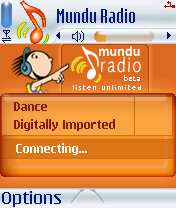 You can define your own play list and also select the radio stations/ genre. Currently around 50 stations are supported right out of the box. You can also define your own station, all you need is the link to the radio station. The play list/radio station list can also be updated from the web from the "My Mundu" section on the site.
To install Mundu on your cell phone you first need to register at the site (yup, this is necessary and you need it to connect from the phone application) and then download the application for your phone.
Check here to see if your phone is supported. As of now this service is available for free and the only charges are for your data plan provided by your network operator. The amount of bandwidth used depends directly on the songs bit rate (a song @ 128 kbps will require more data usage as compared to @64 kbps).
You might not be able to receive calls when you are using your GPRS connection (this varies from one mobile to another) so check your mobile phone's behavior first (it actually depends on your network operator and your mobile phone).


