
The much awaited iPhone has finally been launched by Apple!
The iPhone is a combination of a mobile phone, a widescreen iPod and an internet communcation device. Just like any other Apple product, the iPhone is designed to simplify the way people use their cellphones. It introduces an entirely new user interface based on a large multi-touch display which lets you control everything with just your fingers.
The iPhone lets you enjoy all your content — including music, audiobooks, videos, TV shows, and movies — on a beautiful 3.5-inch widescreen display. It also lets you sync your content from the iTunes library on your PC or Mac. And then you can access it all with just the touch of a finger.
The iPhone features a 2-megapixel camera , voicemail and a predictive QWERTY soft keyboard that prevents and corrects mistake while you type your emails/sms. Although it supports Edge and Wi-Fi, it lacks 3G capabilities.The iPhone features a rich HTML email client and Safari and also a range of other widgets and applications. As of now the iPhone currently lacks business applications. The iPhone is based on OS X Operating System.
The iPhone also introduces a totally new user interface based on a large multi-touch display and innovative new software that lets you control everything using only your fingers. So you can glide through albums with Cover Flow, flip through photos and email them with a touch, or zoom in and out on a section of a web page — all by simply using iPhone’s multi-touch display.
With a storage capacity of 8GB (also available in a 4GB version) and a battery with 16 hours of audio playback capability and an excellent interface, the iPhone may redefine the way we use our cellphone.
More information about the iPhone can be obtained from the Apple site.
Apple iPhone launched!

Mobile applications for Business users
Symbian phones have a huge advantage over other phones as they provide a huge set of third party applications with which we can add a lot of capability to our phones. Unfortunately a large number of mobile users are unaware of what can be achieved using these mobiles.
Most mobiles already come with an integrated Calendar, a To-do list and other simple utilities. Now using a set of freeware applications it is also possible to browse through PDF and document files. Sept Solutions has recently released a freeware symbian application for the opendocument format. The OpenDocument format is an open format for saving and exchanging documents such as presentations, text documents, spreadsheets etc.
note: I have not yet got an opportunity to test this application so watch this space for updates :) or let me know if you are able to use this application successfully.
In addition to this, Adobe has released a freeware PDF reader for mobile phones. It currently supports Palm, Symbian and Pocket PC. Download here.
Applications like these are simple alternatives to commercial software such as QuickOffice.
Tiny Tube - Watch videos from Google Video/MetaCafe/YouTube* on your mobile
You can now watch some of the most popular content from Google Video and MetaCafe at TinyTube.net . This site has been designed for mobile browsers and allows you to view the latest/top videos from Google Video and MetaCafe. When viewed from a non-mobile device it acts just like the normal google videos, however on the cell phone it provides different quality settings which affect the amount of data that you download.
You can also search for videos and see other videos shared by the same user.
The site initially had support for YouTube too, but this feature has been taken down due to violation of YouTube policies. So you would probably have to wait until YouTube comes up with its own mobile version for downloading videos.
Watch movies on your mobile
Watching movies on your cell phone is now a lot more easier, thanks to DivX releasing a mobile version of its player. The player automatically searches for DivX files stored on the mobile phone (this happens only the first time you load the application), if new files are added we need to rescan the file system. It has a facility to fast forward and also control the volume. Full screen mode is also supported and the player has an option to play in landscape or portrait mode.
The application currently doesn't support the "resume" option, so once you close the player you need to fast forward back to the last played location or use the "4" shortcut key to use the "jump to time" feature. Lots of other shortcuts are provided for controlling different features.
The player is currently available for free download from the DivX mobile site. The application is a great freeware alternative to Smart Movie provided by Lonely Cat Games.
The player currently supports Symbian, UIQ, Windows Mobile SmartPhone and Palm.
DivX has also released another application "Discover DivX Mobile" which allows you to subscribe to RSS feeds which notifies you of any new content. The site also provides movie trailers and music videos.
Cool Mobile phone Calculator
Although the Series 60 phones by Nokia come bundled with a calculator, Calcium provides a more efficient interface (not to forget it looks cool too!) to perform the simple mathematical functions like addition,multiplication etc.
Calcium makes use of the joystick and assigns a function to each joystick navigation options (top/left/right/left/center click). That makes it a lot more faster as you don't have to select the option from the menu each time.
In short, Calcium = Simple + Free + Cool :)
SMS Assistant
SMS Assistant is a simple freeware application for Symbian based smart phones. It sends predefined messages automatically to people calling you or sending messages to you. This way you can always focus on your work and at the same time let people know that you are currently unavailable.
The application can be configured so that you can choose to use the service only for specific message types(text messages/multimedia messages) or voice calls. The software can be activated as and when the user needs it and then disable if not required. Currently it is available only for Series 60 and Series 80 mobile phones.
The Series 80 version allows incoming messages to be forwarded to another number and also keeps a log so that the automatic reply will only be sent once to each number.
Mundu : Radio on your mobile!
Mundu Radio provides streaming internet music radio stations to your mobile. As of now it supports Palm, Windows Mobile and Symbian phones. All you need is a data connection (GPRS/CDMA) and you are ready to go!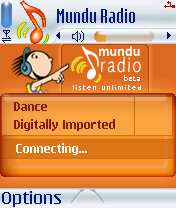 You can define your own play list and also select the radio stations/ genre. Currently around 50 stations are supported right out of the box. You can also define your own station, all you need is the link to the radio station. The play list/radio station list can also be updated from the web from the "My Mundu" section on the site.
To install Mundu on your cell phone you first need to register at the site (yup, this is necessary and you need it to connect from the phone application) and then download the application for your phone.
Check here to see if your phone is supported. As of now this service is available for free and the only charges are for your data plan provided by your network operator. The amount of bandwidth used depends directly on the songs bit rate (a song @ 128 kbps will require more data usage as compared to @64 kbps).
You might not be able to receive calls when you are using your GPRS connection (this varies from one mobile to another) so check your mobile phone's behavior first (it actually depends on your network operator and your mobile phone).


